Anywear Virtual Try On: An Honest Guide
Updated October 2, 2026 · Based on Anywear’s site, its Chrome Web Store listing and reviews, Decart’s privacy policy, and every public test we could find
Anywear is a Chrome extension from Decart that puts clothes from almost any website onto your live webcam feed. We went through every public test of Anywear virtual try on we could find, plus its store reviews and privacy policy, so you know what it does well, where it slips and what it costs before you install it.
WearTryOn is not affiliated with Decart or Anywear. We build our own try-on tools and compare them with Anywear as fairly as we can below.
What is Anywear virtual try on?
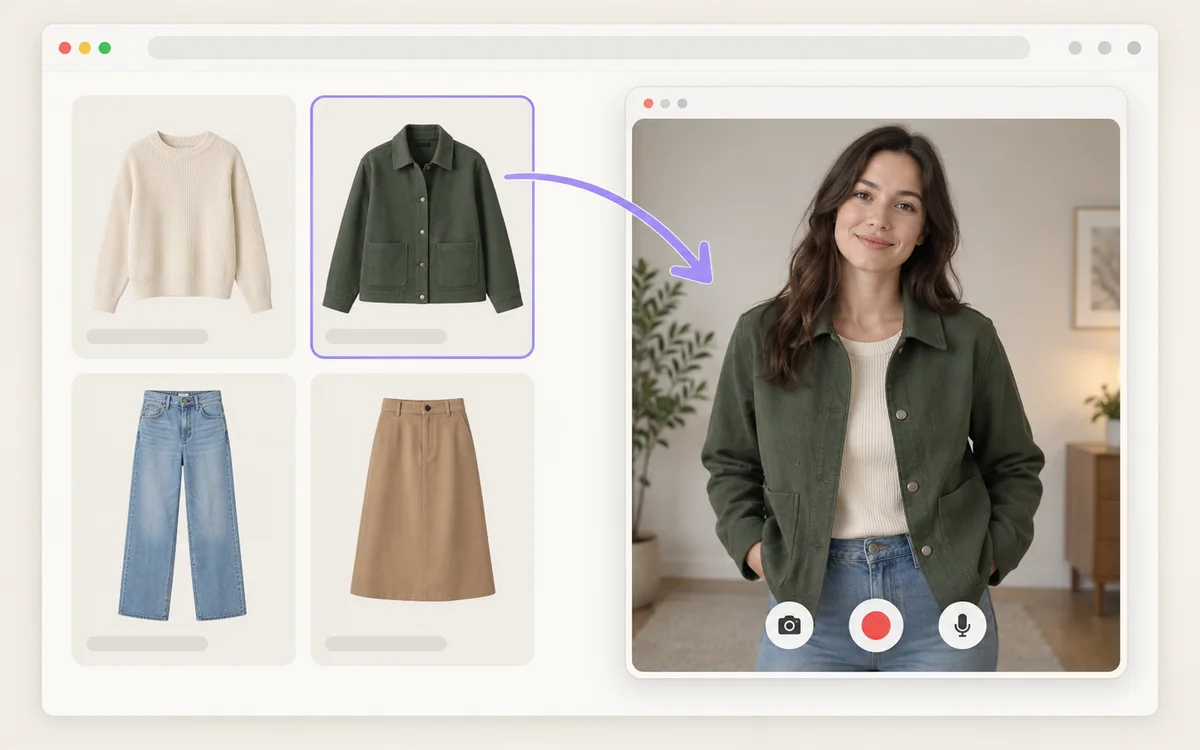
Anywear virtual try on is a live try-on tool made by Decart, an AI video company. You turn on your camera, drag a clothing photo onto the video, and about a second and a half later the garment appears on you and follows you as you move.
Anywear virtual try on runs Decart’s Lucy V-TON video model, which redraws every frame instead of returning one still picture. That is the big difference from photo-based tools such as Google’s “Try it on” or our own virtual try on, which take a photo of you and generate a finished image.
Anywear virtual try on at a glance (checked October 2, 2026)
- Made by
- Decart.AI, Inc.
- Price
- Free during beta, with no account and no card. Recent store reviews report a queue and a two-try limit for free users.
- Runs on
- A Chrome extension on desktop, plus a web app on phones
- Who can use it
- Adults: setup asks you to accept its terms and confirm you are 18 or older
- Clothing
- Tops, dresses, jackets and trousers, according to Anywear’s FAQ
- Chrome Web Store
- About 10,000 users, rated 3.6 out of 5 from 39 ratings (version 2.13, updated September 30, 2026)
How to use Anywear virtual try on in Chrome
Setting up Anywear virtual try on takes a couple of minutes on a laptop or desktop with a webcam.
- 01
Add the extension
Install Anywear from the Chrome Web Store. A welcome page opens; accept the terms, confirm you are 18 or older, and allow the camera.
- 02
Open any page with clothes
A store product page works, and so does a Pinterest board — testers used both. Anywear adds a small “Virtual Try On” tag to clothing images.
- 03
Drag the garment onto yourself
Drag the photo into the floating “Drag a product image here” window. The garment shows up on your video after about 1.5 seconds.
- 04
Move, enlarge, record
Turn or raise your arms to see the drape. The window goes full screen, and one tester downloaded the session as a video.
For cleaner results, testers and Anywear give the same advice: take off thick jackets first, face a window or a lamp, step back so the whole garment area is in frame, and drag a plain product shot rather than a busy outfit photo.
What testers found using Anywear virtual try on
We watched every public hands-on test we could find as of October 2, 2026 — three YouTube videos — and read a retail expert’s write-up and the newest Chrome Web Store reviews. Here is what they saw.
Where it shines
- Clothes move with you: raising arms, turning and tugging a collar all track live
- Jackets, suits and shirts look the most convincing; one tester praised the fabric sheen
- Two people in one frame both get dressed at once
- Works far beyond shops: testers dragged outfits straight from Pinterest
Where it slips
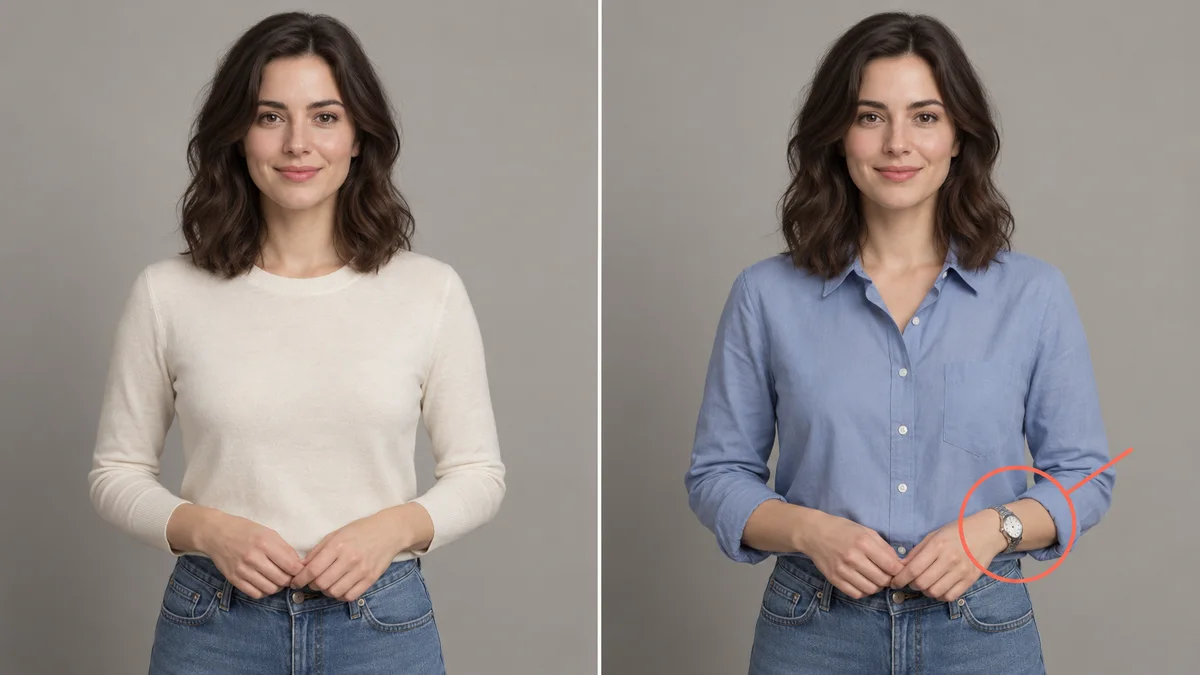
- It invents accessories: a watch appeared on a bare wrist, and a cap from the model photo came along
- Sides and back are guesses, and legs sometimes glitch
- Trousers were once mapped onto the wrong part of the body
- Free users report a queue that loops back on itself, plus crashes and slow starts

The retail expert’s conclusion matches what the videos show: Anywear virtual try on is good at answering “could I pull off this style?” and “is this my color?”, but it can’t tell you whether a size will fit. For that, compare a few pieces side by side on your own photo with virtual outfit try on.
Anywear virtual try on tests we reviewed
- Gobinda Tarafdar on YouTube: hands-on test with Pinterest outfits, August 12, 2026
- Y2k Pair on YouTube: a couple trying coats and costumes, September 28, 2026
- The Solo Engineer on YouTube: tech, privacy and rivals explained, October 1, 2026
- Linda Bustos on LinkedIn: an e-commerce expert’s write-up, September 2026
- Chrome Web Store reviews: the ten newest, September 24 to October 1, 2026
Does Anywear work on iPhone, Android or Safari?
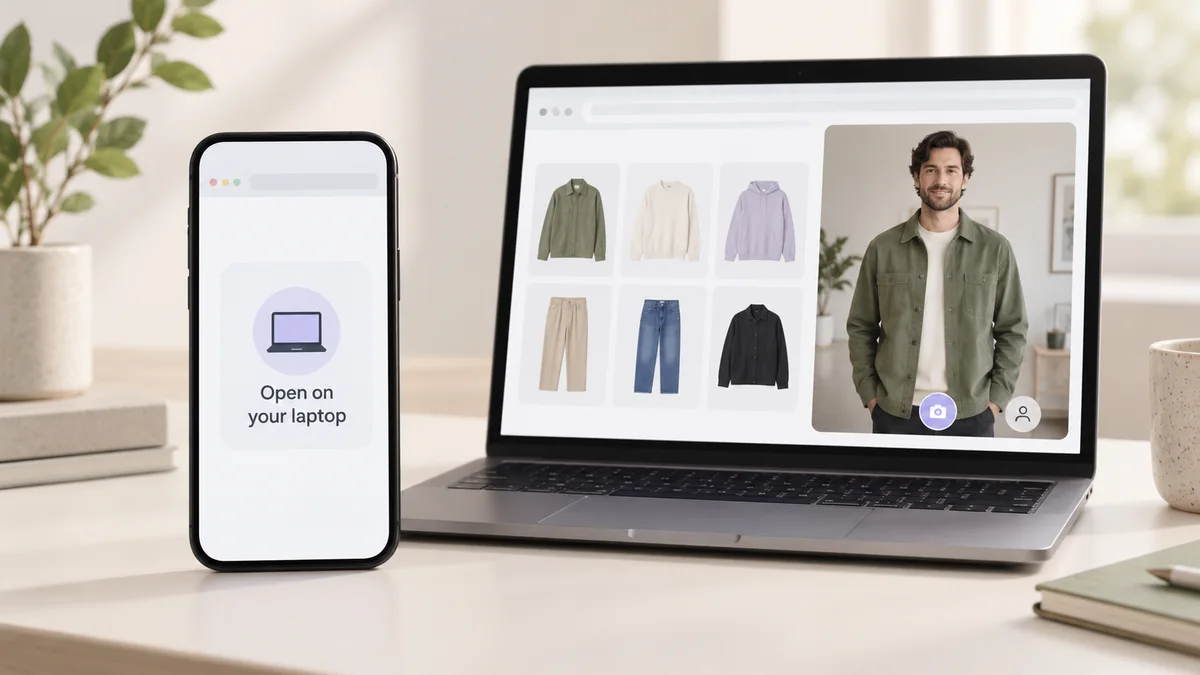
The extension is desktop-only, because Chrome doesn’t run extensions on phones. On a phone, Anywear sends you to its web app instead.
Anywear doesn’t list supported phone browsers, and none of the tests we found used a phone, so iPhone Safari is an open question.
If you mostly shop on your phone, a photo-based try-on is the dependable option today. Our live virtual try on page opens your phone or laptop camera right in the browser: take a photo, then try clothes on it — no app and no extension.
Is Anywear virtual try on free and private?
Free: officially yes, for a limited time during the beta, with no account and no card. In practice, several Chrome Web Store reviews from late September 2026 describe a waiting queue for free users and a limit of two tries. Anywear hasn’t announced paid pricing.
Private: it depends on which page you read. Anywear’s FAQ describes the try-on as a live stream that lasts for your session, not a photo library it keeps. Decart’s privacy policy (updated August 20, 2026) is broader: it collects live video and audio recordings, may use data to improve its products and for research, and keeps it until deleted.
In practice, treat Anywear virtual try on like a video call: assume the stream is processed on Decart’s servers, check what is visible behind you, and remember it is for adults only.
For comparison, WearTryOn only sends the photo you choose and never uses your uploads or results to train AI models. See our privacy policy.
Anywear not working? Quick fixes
Most problems with Anywear virtual try on come down to the free-tier queue, camera permissions or the image you drag.
- 01Stuck in a queue loop: reload the page, try outside busy hours, and don’t drag a new image while you are still queued.
- 02Black camera window: click the camera icon in Chrome’s address bar, allow the camera, then reload.
- 03Camera busy: quit Zoom, Meet, FaceTime or OBS — any of them can hold the webcam.
- 04Extra accessories or odd limbs: drag a plain product shot with no model, hat or watch in it.
- 05On a phone: the extension can’t install there. Use the web app, or a photo-based try-on.
Anywear virtual try on alternatives compared
Anywear virtual try on is the only live video option here; the others trade motion for a still result you can keep or compare. As of October 2, 2026:
| Anywear | WearTryOn Live Try On | WearTryOn Virtual Try On | Google “Try it on” | |
|---|---|---|---|---|
| How it works | Live camera video | Take a photo with your camera, then AI try-on | Your photo plus a product screenshot from any store | A selfie becomes AI-generated try-on images |
| Where it runs | Chrome extension on desktop; web app on phones | Any modern browser, phone or desktop | Any modern browser, phone or desktop | Google’s shopping results, in selected countries |
| Best for | Style and color, in motion | Quick looks from your phone camera | Comparing several items before buying | Items listed on Google |
| Keep your results | Download a session video | History and closet, private for 30 days | History, closet and side-by-side compare | Saved try-on profile |
| Cost | Free beta; users report a queue and two free tries | Free credits when you sign in, plus daily check-ins | Free credits when you sign in, plus daily check-ins | Free |
| Account | Not needed | Needed to generate | Needed to generate | Google account |
Shopping on your phone, or stuck in the Anywear virtual try on queue? Try clothes on with your camera at live virtual try on. Deciding between items from different stores? Put them side by side on your own photo with virtual try on. Want to change one piece in a photo you already have? Use the AI clothes changer. Want the whole look changed at once? Try the outfit changer.
Want live try-on on your phone?
We’re building a live mode that runs in phone browsers. Sign in and join the waitlist on our Live Try On page, and we’ll email you when it opens.
Join the live mode waitlistAnywear virtual try on FAQ
Is Anywear virtual try on free?
Officially yes, during its beta: no account and no card. Since late September 2026, though, Chrome Web Store reviewers report a queue for free users and a limit of two tries. Anywear hasn’t announced paid pricing.
Do I need to upload a photo to use Anywear virtual try on?
No. It works on your live camera feed, so there is no photo to upload. You drag clothing images from a store or a site like Pinterest onto the video instead.
Does Anywear work on iPhone?
Not as an extension — Chrome extensions don’t run on phones. Anywear offers a phone web app without listing supported browsers. A browser-based photo try-on such as WearTryOn’s Live Try On works on iPhone in Safari.
Why does Anywear add a watch or hat I’m not wearing?
The model copies details from the image you drag, and sometimes invents them. Testers saw a watch appear on a bare wrist. A plain product shot with no model usually avoids it.
Is Anywear safe to use?
It is an adults-only Chrome extension from Decart.AI, Inc. Its FAQ calls the try-on a session stream, but its privacy policy says live video may be collected, used to improve products and kept until deleted. Keep anything private out of view.
Is WearTryOn related to Anywear?
No. WearTryOn is an independent try-on site with no connection to Decart or Anywear.