WearTryOn help: how to use every tool
Updated October 8, 2026 · 11 tools
This WearTryOn help page walks through all 11 tools in four steps each: what to upload, what to tap, what it costs and how to read the result. Yellow numbers in the screenshots match the steps.
These WearTryOn help screenshots show a phone, signed out, so the main button reads Sign in. On a computer the layout differs; names and order do not.
WearTryOn help basics: before you start
Use a photo you may use
Your own photo, or one the person agreed to. Face the camera in even light.
Credits per action
The number on a button is what that action costs. New accounts get 10 free credits, each daily check-in adds 2, and failed runs are refunded.
Live preview vs AI photo
A live preview is a free overlay for fast browsing. Create AI photo makes a new picture. Neither replaces a size chart or a colorist.
Camera will not open?
Upload a photo or pick a sample model, or allow the camera again in browser settings.
WearTryOn help: which tool do I need?
Each row jumps to its WearTryOn help section.
| I want to… | Tool |
|---|---|
| Swap one piece of clothing | AI Clothes Changer |
| Put a full outfit on a photo | Outfit Changer |
| Wear the outfit from another photo | Outfit Swap |
| Compare up to three items you might buy | Virtual Try On |
| See clothes move with you on camera | Live Try On |
| Try a new hairstyle | Hairstyle Try On |
| Get your outfit rated | AI Outfit Rater |
| Try on glasses frames | Glasses Try On |
| Try a new hair color | Hair Color Try On |
| Try lipstick, eyeshadow and blush | Makeup Try On |
| Make a Halloween costume photo | Halloween Costume Generator |
01 · WearTryOn help
AI Clothes Changer: swap one item
5 or 10 credits · Ava and Leo samples free
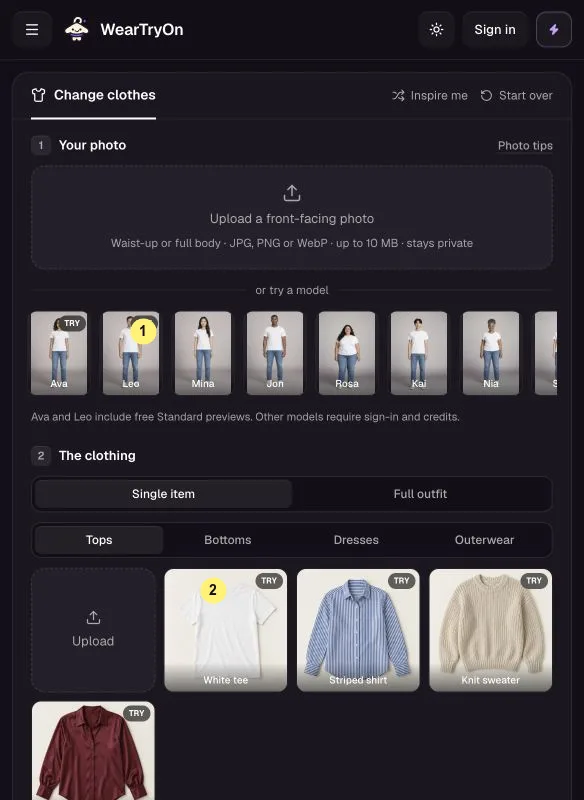
Upload a front-facing photo under Your photo, or pick a sample model such as Ava or Leo 1.
Keep Single item, choose Tops, Bottoms, Dresses or Outerwear, and pick a garment 2, or upload a clear picture of one.
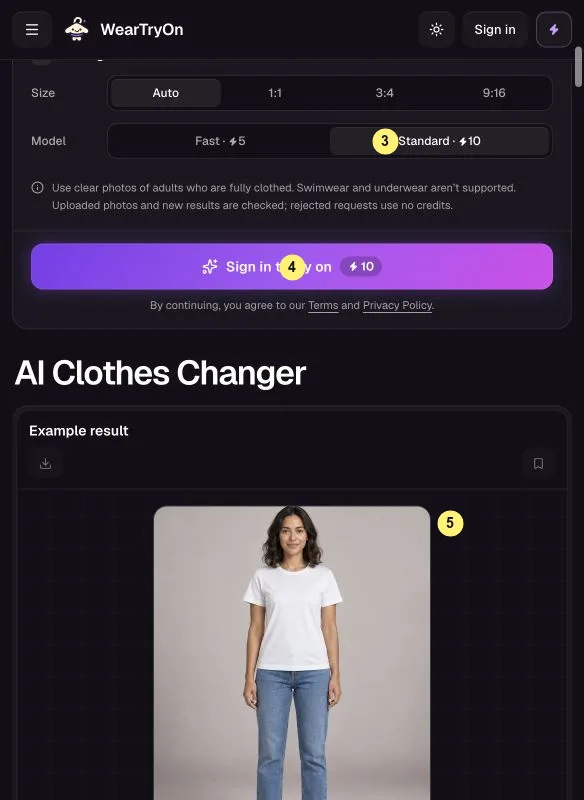
Pick the size and Fast or Standard 3; Standard keeps more detail. Only the ready-made Ava and Leo results work signed out.
Tap Change clothes 4. In the result 5, drag the slider to compare, then download or save to My Closet.
Most WearTryOn help questions here come down to the photo: one person, facing forward, arms down.
02 · WearTryOn help
Outfit Changer: change the whole look
5 or 10 credits per image
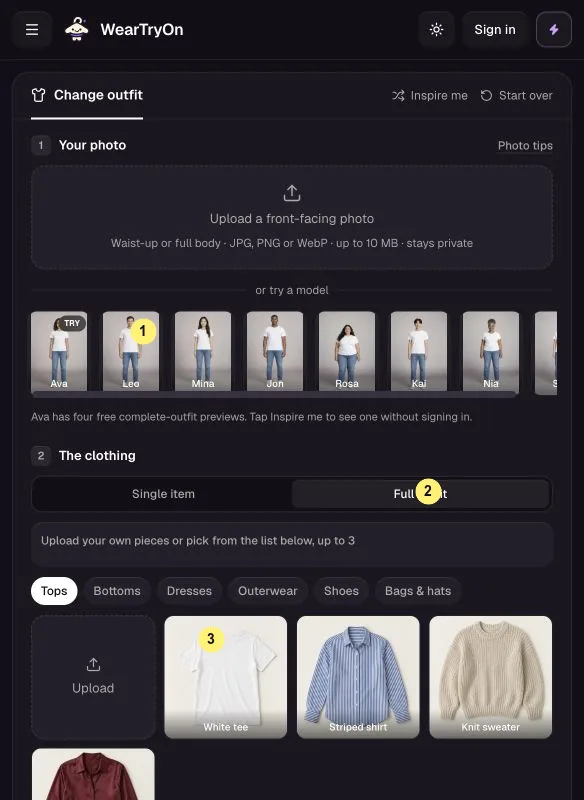
Upload a photo or pick a sample model 1.
The tool opens on Full outfit 2. Pick up to three pieces by category 3; a dress replaces the top and bottoms. Inspire me loads a sample look.
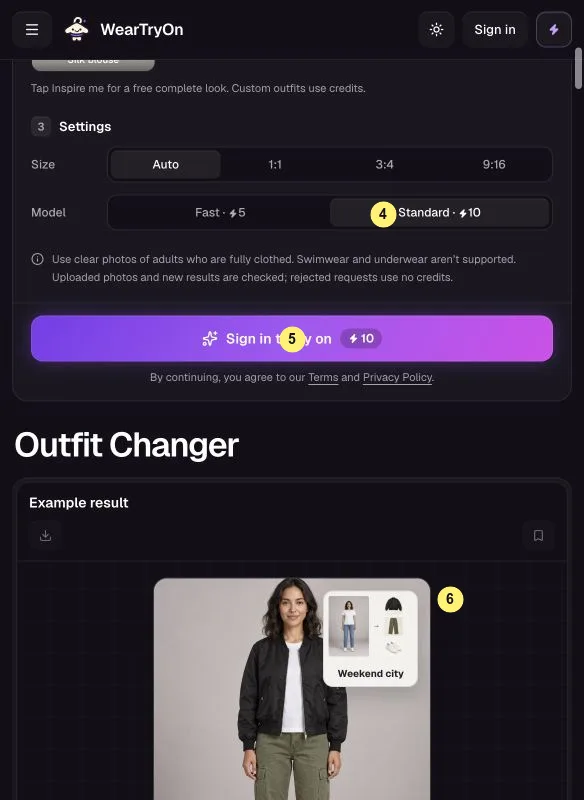
Choose the size and Fast or Standard 4, check the credits, then tap Change my outfit 5. Your own combinations need an account.
Compare before and after in the result 6, then download or save it.
WearTryOn help tip: pick shoes last, since they change the proportions of the whole look the most.
03 · WearTryOn help
Outfit Swap: copy a look from another photo
5 or 10 credits per image
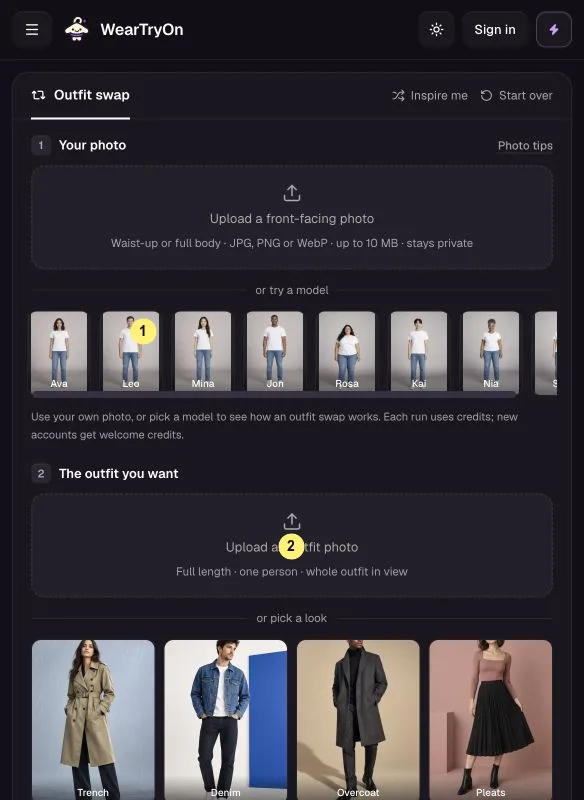
Under Your photo, upload yourself or pick a model 1.
Under The outfit you want, add a full-outfit photo of one person with clothes and shoes in view 2, or pick a sample look.
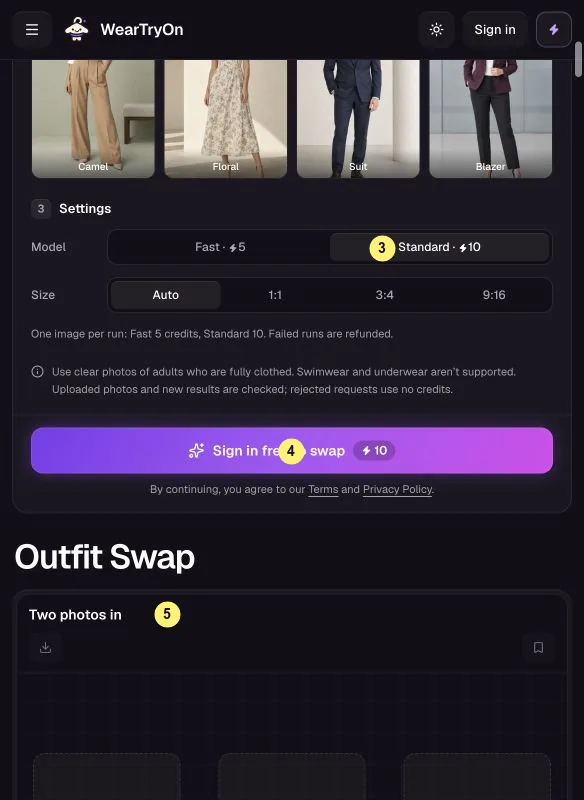
Choose the size and Fast (5) or Standard (10) 3. Signed in, tap Swap outfits 4.
Compare both photos in the result 5. To try another look, replace only the second photo.
WearTryOn help tip: the second photo sets the clothes only, so your pose and background stay your own.
04 · WearTryOn help
Virtual Try On: compare items before you buy
5 or 10 credits per item · Ava and Leo samples free
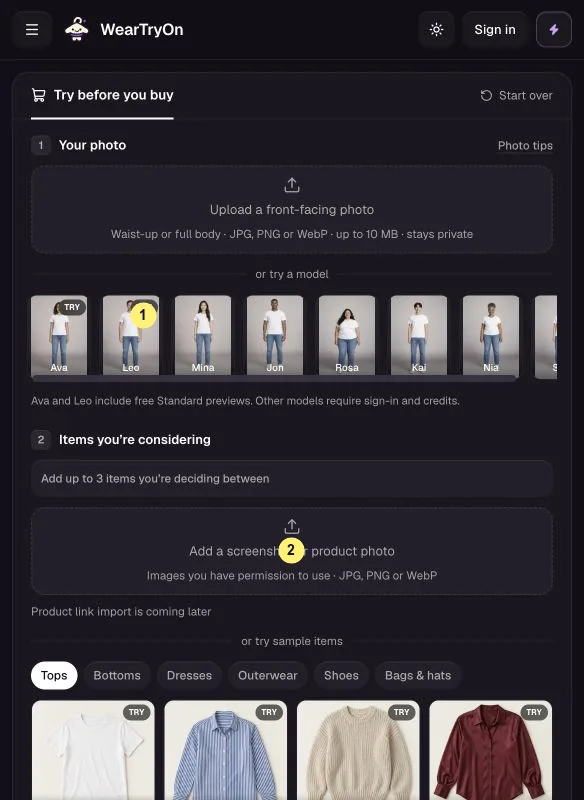
Upload your photo or pick a model 1. Ava and Leo have free previews with the sample tops.
Add up to three candidates under Items you’re considering 2: product images or sample items, each with its category. Product links are not supported yet.
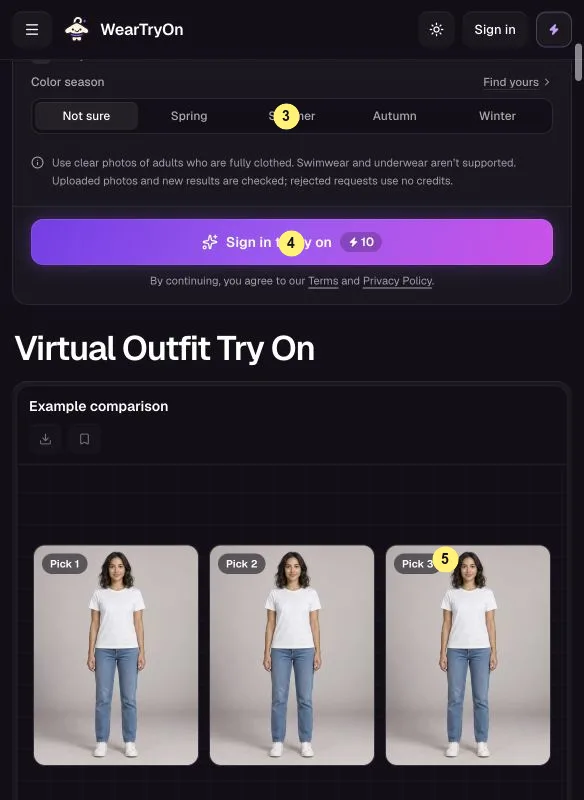
Color season is optional 3. Tap Try it on or Try on 3 items 4; each new item is charged and the button shows the total.
See results side by side in All picks 5, switch to Before / after for detail, and tap Mark as my pick on the winner.
Keep this WearTryOn help section open while you shop: screenshot each product page, then add the images here.
05 · WearTryOn help
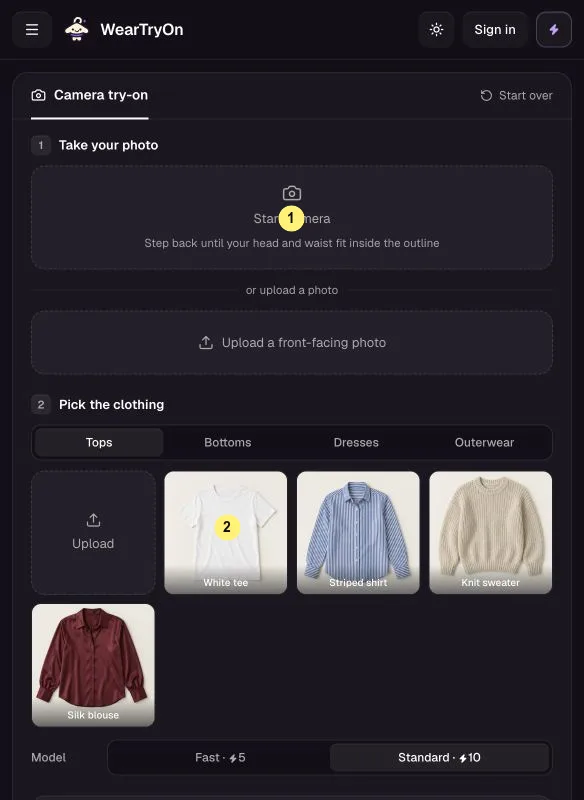
Live Try On: preview clothes on camera
Live preview free · AI photo 5 or 10 credits
Tap Start camera 1 and allow access, or upload a photo. Fit your head and waist inside the outline.
Pick a preset top or jacket 2 for the free live preview. Uploaded clothes are only used for the AI photo.
Choose a countdown and tap Take photo, or Retake. You can switch cameras or mirror the view.
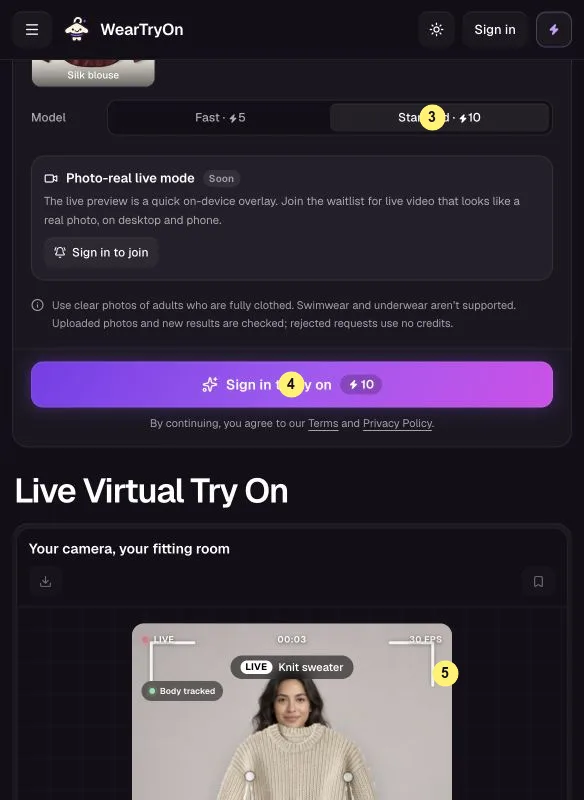
For a photo with real folds and light, pick Fast or Standard 3 and tap Try it on 4; this needs an account. The walkthrough is marked 5.
Camera stays black? The WearTryOn help basics above explain how to allow it again.
06 · WearTryOn help
Hairstyle Try On: test a new cut
5 credits per hairstyle photo
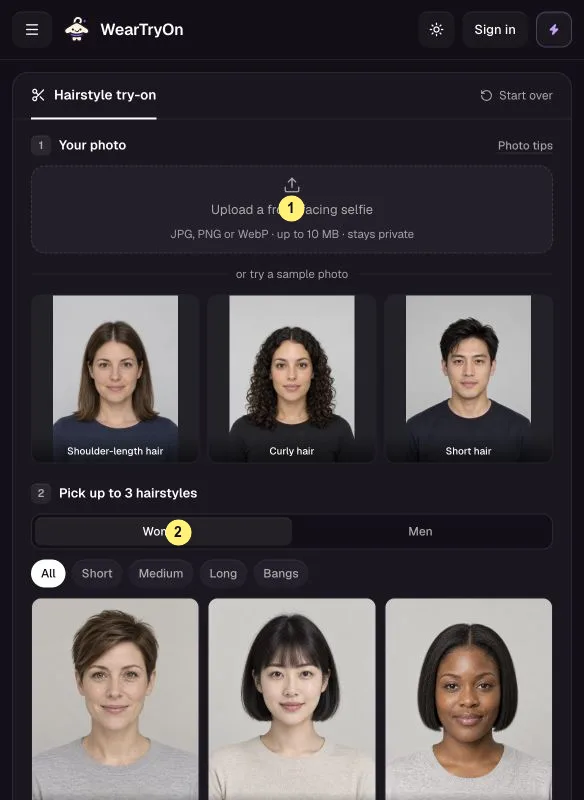
Upload a clear, front-facing selfie 1 or pick a sample face, with no hat or glasses. Face shape is read on your device for free.
Filter with Women / Men, length and bangs 2; any style is open to anyone. Pick up to three.
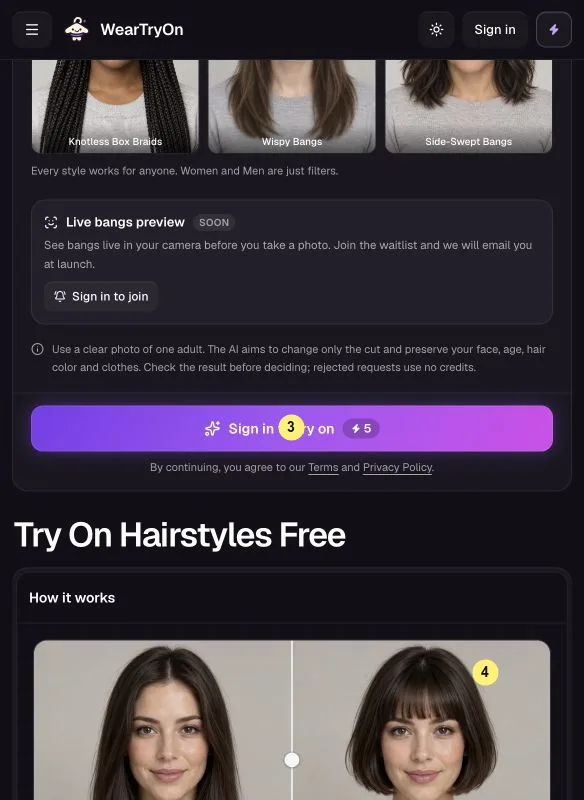
Signed in, tap Try this hairstyle or Try 3 hairstyles 3. Each photo uses 5 credits.
Compare results 4 side by side or with Before / after, then download or save one for your stylist.
WearTryOn help tip: pull long hair behind your shoulders so the new style has room to show.
07 · WearTryOn help
AI Outfit Rater: get a score and fixes
1 free a day, 3 signed in, then 1 credit each
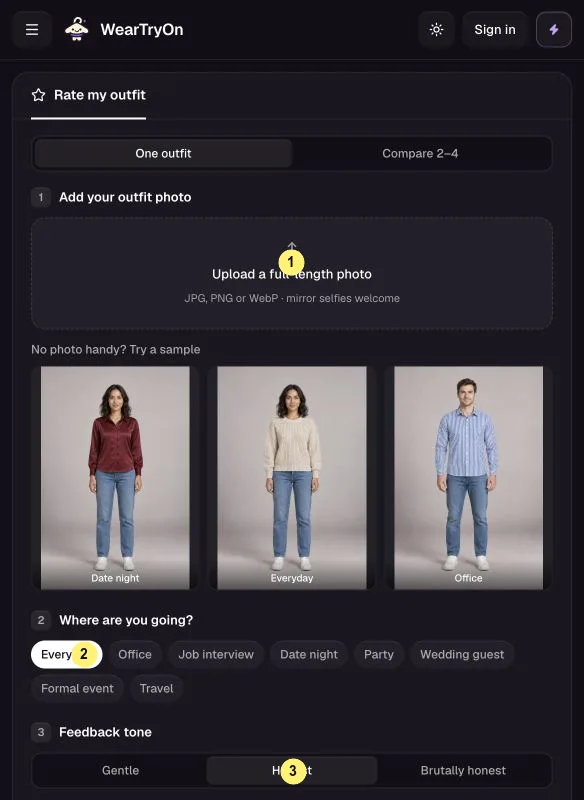
Under One outfit, upload your outfit photo 1 or pick a sample. Compare 2–4 ranks several looks and needs an account.
Pick the occasion 2, such as Office or Date night, and a tone 3: Gentle, Honest or Brutally honest.
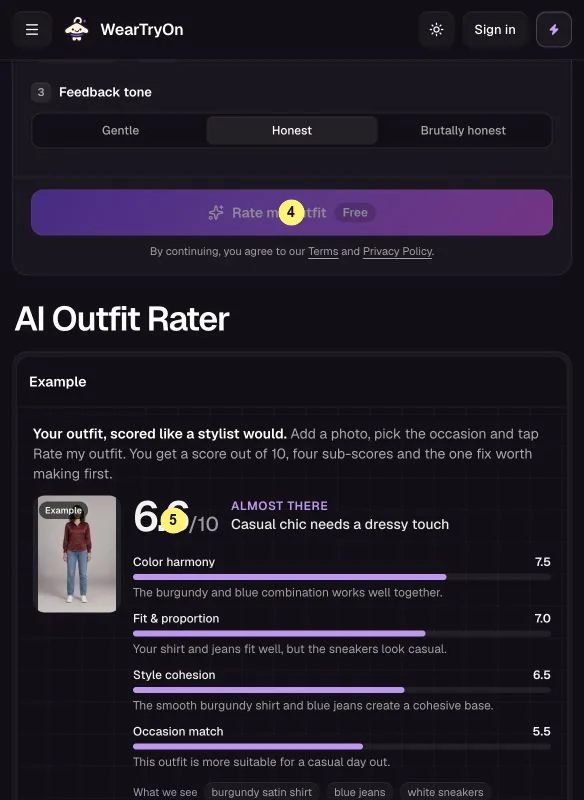
Tap Rate my outfit or Compare outfits 4.
Read the overall score, the color, fit, cohesion and occasion scores, and the first fix 5. Signed-in ratings go to your Style log.
WearTryOn help tip: shoot in daylight against a plain wall so the color score rates the clothes, not the lamp.
08 · WearTryOn help
Glasses Try On: try frames on your face
Live preview free · 5 credits per AI photo
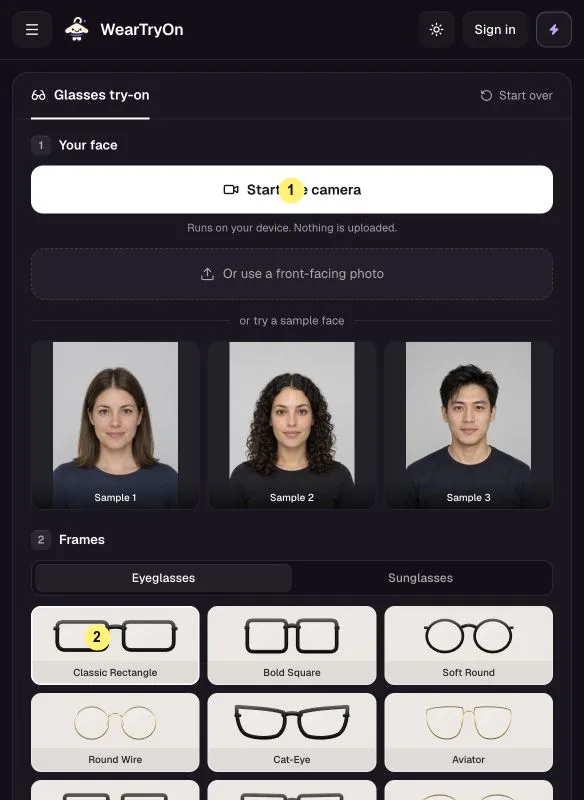
Tap Start live camera 1, or upload a front-facing photo or pick a sample face.
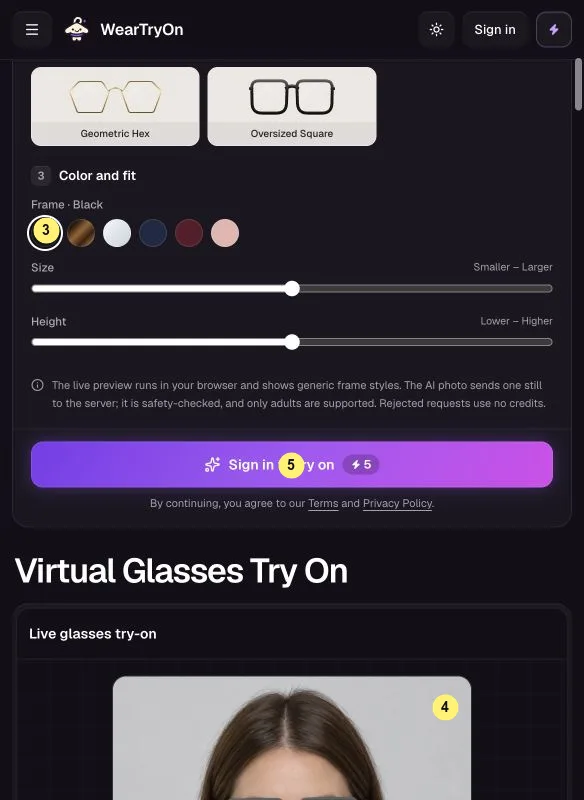
Pick a frame under Frames 2, then adjust color, size and height in Color and fit 3. Sunglasses are there too.
The live preview 4 is free. Snapshot keeps up to four looks and Compare shows them side by side.
For an AI photo wearing the glasses, sign in and tap Create AI photo 5.
The Fit card estimates face shape, frame width and eye distance; this WearTryOn help page is no substitute for an eye test.
09 · WearTryOn help
Hair Color Try On: test a dye shade
Live preview free · 5 credits per AI photo
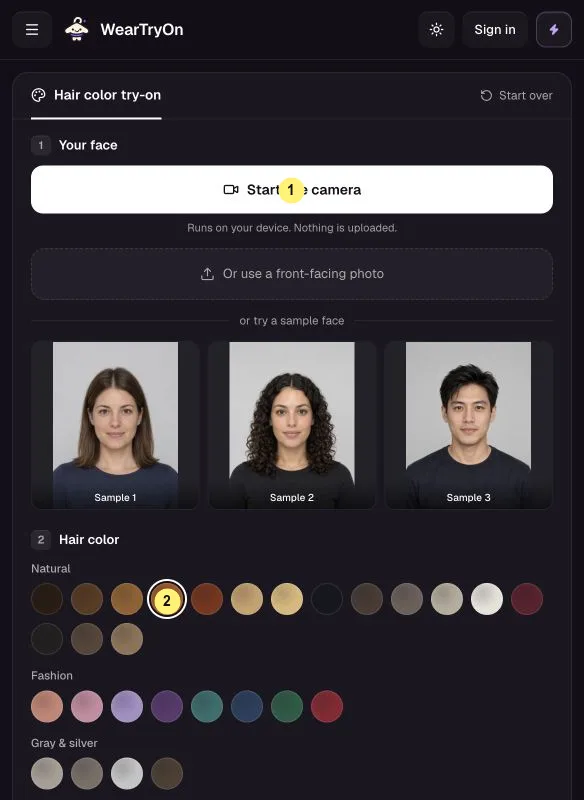
Open the live camera 1 with your hair in frame, or upload a photo.
Browse 28 shades in Natural, Fashion and Gray & silver, and tap a swatch 2 to see it live.
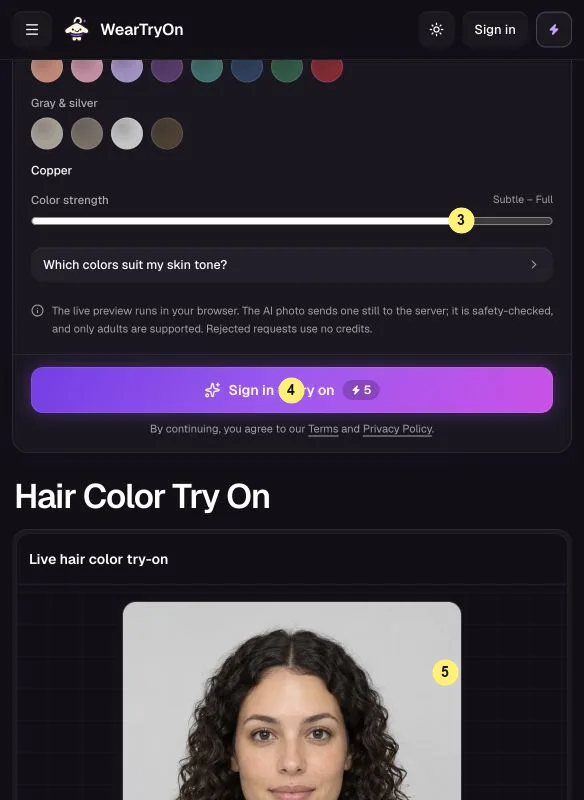
Use Color strength 3 and check Your hair depth. Shades tagged BLEACH usually need lightening first.
In the preview 5, Snapshot keeps up to four shades for free. For an AI photo, sign in and tap Create AI photo 4.
WearTryOn help tip: compare one natural and one fashion shade side by side before you decide.
10 · WearTryOn help
Makeup Try On: test lips, eyes and blush
Live preview free · 5 credits per AI photo
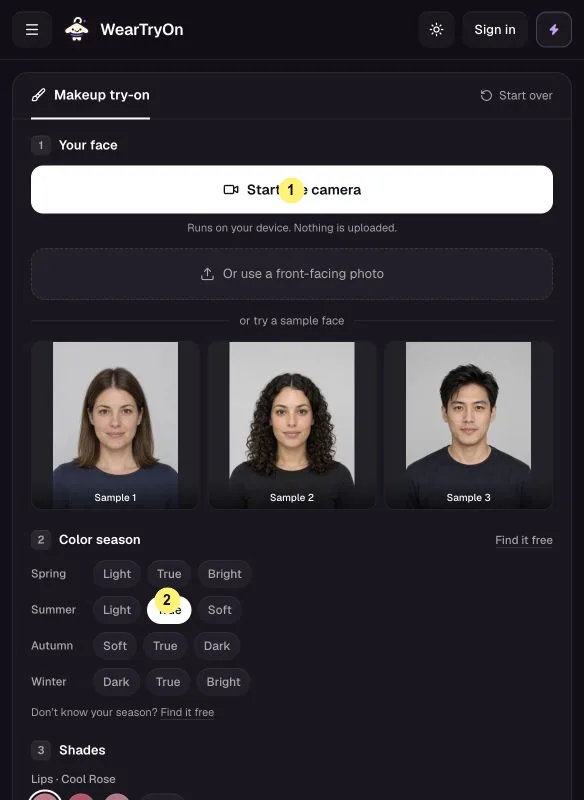
Open the camera 1, or upload a front-facing photo or pick a sample face.
Pick your Color season 2; Find it free helps if you do not know it.
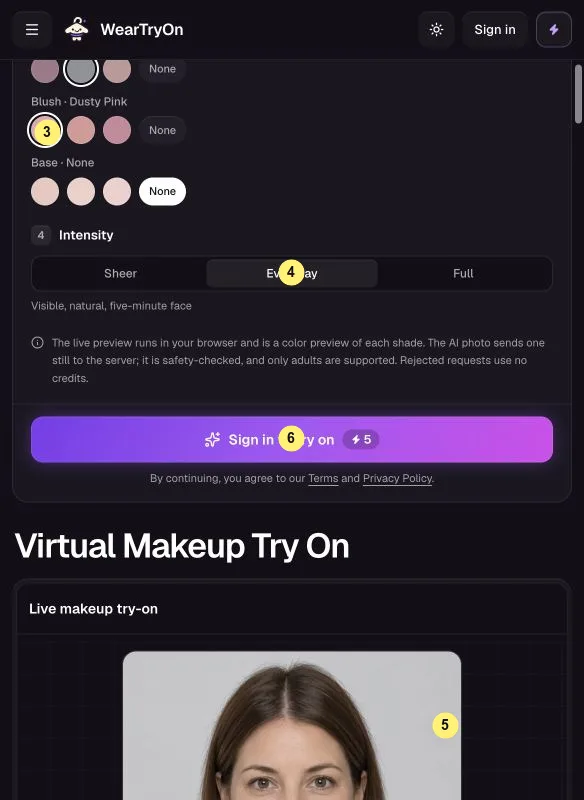
Choose Lips, Eyeshadow, Blush and Base 3, or None. Set Intensity 4 to Sheer, Everyday or Full.
Snapshot up to four looks in the live preview 5. For an AI photo, sign in and tap Create AI photo 6.
WearTryOn help tip: start with Sheer, the closest match to everyday makeup in daylight.
11 · WearTryOn help
Halloween Costume Generator: see yourself in costume
First costume free · then 5 credits each
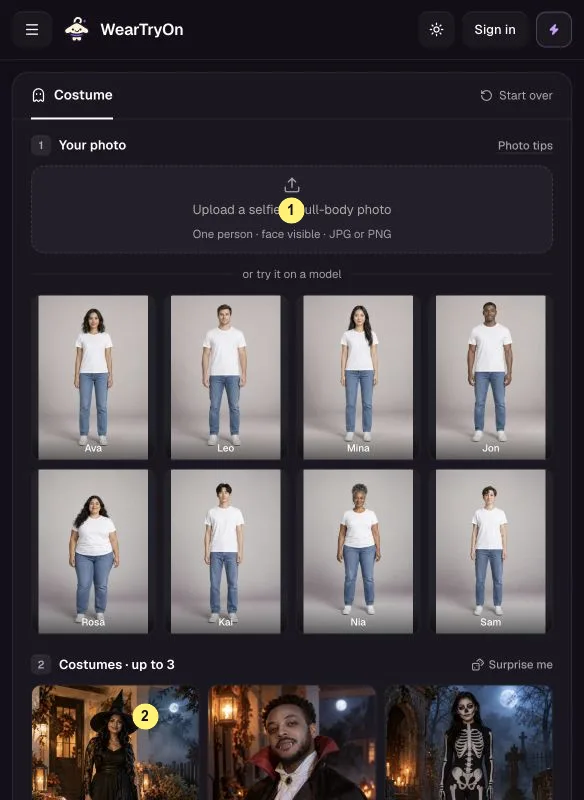
Upload a solo photo with a clear face 1, or pick a model. Full-body photos show the whole costume.
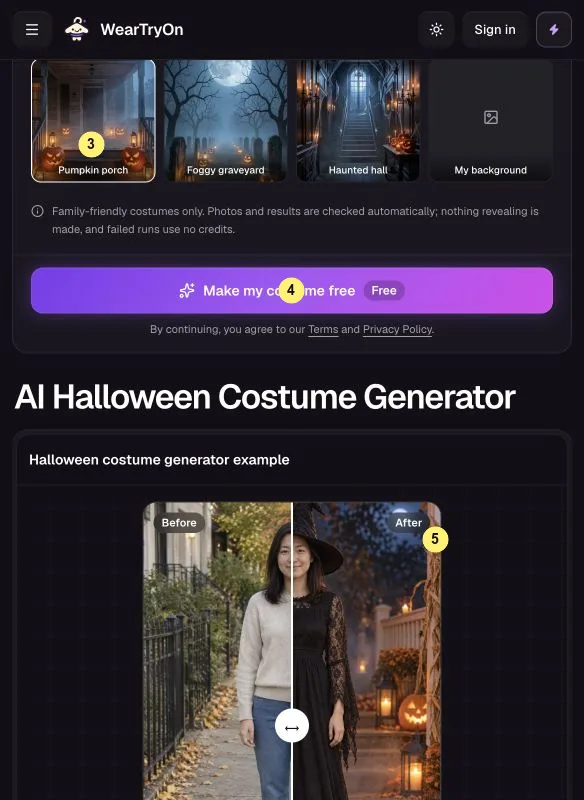
Pick up to three of 12 costumes 2, or tap Surprise me. Choose a Background 3, or keep your own.
Signed out, tap Make my costume free 4 for your first costume. Extra costumes need an account; check the price on the button.
Compare results 5 side by side or with Before / after. Signed in, save them or ask friends to vote.
WearTryOn help tip: save a costume first to get a voting link for friends.
WearTryOn help for credits, sign-in and saving
Samples and live previews work signed out. Sign in to use your own photos and get 10 free credits.
One more WearTryOn help tip on credits: check in once a day for 2 more credits and keep a streak going. Saved results stay in My Closet, and every run is listed in History. When you need more credits, plans and credit packs also remove the watermark from your results.
- M
- T
- W
- T
- F
- S
- S
WearTryOn help FAQ
Why can’t I tap the button?
Check the required choices: a photo plus the clothes, hairstyle, frame or costume. Camera tools need one face toward the camera; some tools need you to sign in.
Why did my photo upload fail?
Use a clear JPG, PNG or WebP of one person facing forward. Very revealing clothing is turned down by the safety check.
Will the result look exactly like the real item?
Not always. Results compare color, style and overall look; still check the size chart and fabric before you buy.
Do I lose credits when a run fails?
No. Credits for a failed run go back to your balance automatically.
Where can I get more WearTryOn help?
Write to us from the Support page with the tool name and what you saw, and we will reply by email.